
Simcenter Inspire Cast distributor (Siemens)
Simcenter Inspire Cast: high pressure die casting (HPDC) simulation
See how your part fills and how it solidifies inside the die before the die exists. Simcenter Inspire Cast (formerly Altair Inspire Cast) calculates the path of the metal and that of the air inside the cavity, and shows you where the defects are going to land while you can still move them with a click and not with a weld in the steel.
The results
What you see when the calculation ends
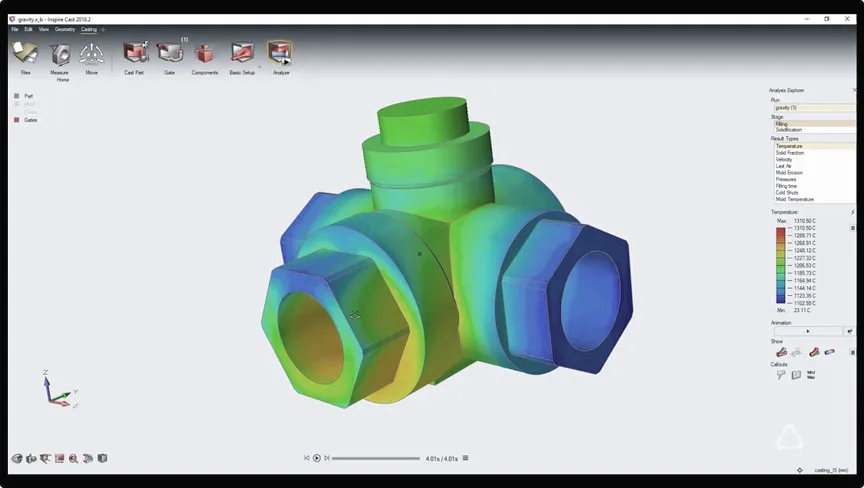
The results are not a table of numbers: they are the film of what is going to happen inside the die. The advance of the metal front shot by shot, the pressure and the path of the air, the temperature map at the end of filling and the order in which each area of the part solidifies.
That is what turns a discussion of opinions about a die into a decision backed by evidence, and what lets you walk into the meeting with the customer or with the tool shop showing why it is worth moving a gate instead of defending it with words.
What you can anticipate
The defects you pay for on the machine, solved on the computer
Almost every chronic defect on a die cast part is decided at two moments: how the metal enters the cavity and how the heat leaves it. Both can be studied before cutting steel. This is what you can anticipate:
Porosity from trapped air
The calculation tracks the metal and the air in the cavity at the same time, so you can see in which areas the air ends up cornered and compressed when the metal front closes in from two sides. That is where the bubbles show up later: the ones machining opens up, or the ones that make a part leak under pressure.
Shrinkage cavities and shrinkage porosity
Seeing the order in which the part solidifies brings out the volumes that end up isolated: liquid metal surrounded by metal that is already solid, with no way of being fed. Those are the hot spots to attack with cooling, with wall thickness or with the feeding system.
Short shots in thin walls
In thin sections the margin is thousandths of a second. The simulation tells you whether the cavity manages to fill at the plunger velocity and the temperature you have planned, or whether you are going to fall half a millimeter short of the last rib.
Cold shuts and flow marks
When two metal fronts meet already too cold they do not weld: they leave a line that is a crack under another name. Seeing the temperature of the front at the moment they meet lets you move gates and vents so that point falls outside the critical area of the part.
Die erosion and hot spots
The areas where the metal hits fastest and hottest are the ones that eat the steel. Identifying them before machining the tooling extends die life and avoids redesigns a few thousand shots in.
Cycles longer than they need to be
Solidification time is set by the area that takes longest to cool. If you know which one it is and why, you can work on it instead of penalizing the whole cycle for safety.
The workflow, step by step
How you work with Inspire Cast
The software is meant to be used by process and product engineering, not by an analysis department. The workflow is always the same, and that is why it is learned quickly:
01
You load the geometry
You import the CAD model of the part and, if you have it, that of the die. Nothing has to be rebuilt and no separate model has to be prepared in order to simulate: you work on the geometry that already exists in the engineering office.
02
You choose the process and the alloy
Each casting process comes with its own start-up template, with the parameters that belong to it. You define the alloy, the metal and die temperatures, and the filling system with its gates, runners and vents.
03
The calculation runs
The solver spreads the work across several cores of the computer and resolves filling and solidification. A typical aluminum part runs within the same working day, so the bottleneck stops being the calculation and becomes deciding which alternative to try.
04
You read the results and decide
You review the advance of the metal front, the air, the temperature and the order of solidification, adjust whatever is needed and run it again. That loop, repeated two or three times on screen, is what saves the trips back to the tool shop.
Which processes it covers
Although high pressure is the ground where we use it most, the software is not limited to it. Each process comes with its own start-up template:
- High pressure die casting, cold chamber and hot chamber
- Low pressure die casting
- Gravity die casting (permanent mold)
- Tilt pour casting
- Investment casting (lost pattern)
Who it is for
We work above all with aluminum foundries in Mexico, which are the ones facing the most demanding combination: parts that keep getting thinner, automotive customer tolerances and constant pressure on cost per part. It also fits zamak and magnesium.
- Die casting plants that want to bring down the scrap of a part already in production.
- Product engineering that needs to validate the manufacturability of a new part before committing the tooling.
- Tool shops that want to deliver a filling design they can already defend.
- Teams quoting parts that need to know, before signing, whether that geometry can be made at the price they are offering.
The software does not replace process judgment
A badly set up simulation gives beautiful, wrong results. That is why we do not sell the license and disappear: we roll it out, train your team on parts from your own catalog and stay available for the difficult cases. And if what you need today is to solve one specific defect without setting up a simulation area, we do it ourselves as a service.
Get to know our die casting consulting and the training programs for process engineering.
Frequently asked questions
Which defects can I anticipate with Simcenter Inspire Cast?
Porosity from trapped air and from shrinkage, shrinkage cavities, short shots, cold shuts, areas of die erosion and hot spots that stretch the cycle. The calculation tracks the metal and the air inside the cavity at the same time and resolves solidification, so you can see where the air gets compressed, where the fronts meet already cold and which volumes end up isolated with no feeding.
Which casting processes does it cover?
High pressure die casting in cold chamber and hot chamber, low pressure, gravity die casting, tilt pour and investment casting. Each process has its own start-up template with the parameters that belong to it, so you are not starting from a blank sheet every time you open a new project.
Do I need a simulation specialist to use it?
No. The work is guided in stages—geometry, process, alloy, calculation and results—and it is normally run by the process engineer or the die designer, not by someone dedicated full time to simulation. With the initial training we give when rolling it out, a team is usually autonomous within a few sessions; what still takes effort is not driving the software but reading properly what it shows, and that is where we stay alongside you.
How long does a simulation take?
It depends on the size of the part, on the level of detail of the die and on the computing hardware, but the calculation is spread across several cores and a typical run on an aluminum part is resolved within the same working day. In practice calculation time stops being the problem: what sets the pace of the project is how many filling alternatives you want to compare.
How much does a Simcenter Inspire Cast license cost?
The price is not public and depends on the licensing scheme, on the number of users and on whether you are going to use only Inspire Cast or other Siemens applications as well through Altair One. We prepare a tailored quote with no commitment: write to us or schedule a demo and we will go through it together with your case, comparing the scenarios that make sense for the size of your operation.
Bring a part of your own to the demo
The best way to know whether this is useful to you is not a brochure: it is seeing your own part simulated. In about 45 minutes we take a real case from your plant—the defect that keeps coming back, the die you are about to sign off—and we show you what information you would have had before making it. With no commitment to buy.
We also distribute Simcenter Simsolid for the structural side of the die and Altair One for cloud licensing. Back to the software catalog.